
Frequently Asked Questions
Need to contact an expert? Our team can be reached from 8 am – 5:30 pm EST Monday through Friday for a live call or chat.
Select a topic:
Site Updates | Products | Designs Requests & Orders | Cart, Checkout & Payments | Quotes | Accounts & Dashboard | Emails & Notifications
Recent Site updates
We’ve updated the site experience from top to bottom, including navigation, product search and browsing, product pages, Design Requests, checkout, accounts, quoting, and customer communications.
The goal is to make it easier to find what you need, understand your options, and complete your order.
No. If you already have a World Emblem account, you can continue using your existing account credentials.
Your account information and applicable order history have been carried into the new experience. You may notice some changes to how information is organized in your dashboard.
Products
Client-supplied garments are always welcome at World Emblem.
If you are an Enterprise customer, you can place a Decoration Order, formerly called a Customer Supplied Garment (CSG) order, yourself by choosing Decoration Order from the Start Designing menu.
If you aren’t an Enterprise customer, you can easily upgrade your account by choosing Upgrade to Enterprise from your Account and Orders menu.
You can also contact Client Services at 1-800-766-0448 to place your order through one of our representatives.
After your Decoration Order is placed, packages may be shipped to us directly from your vendor or your current location. Our Decoration Application or Client Services representatives will provide a Decoration Order number for you to place on the outside of the box. This information will allow us to match your order with your box of incoming garments so they can be quickly moved into production.
We offer several different types of backing for our products. The backing needed depends on where you're applying your patches. Check out our Backing Comparison page to learn about the characteristics of each backing option that we offer.
Yes. For products with variable pricing, the displayed price updates as you select different options.
If a combination of options isn't available, the site will automatically disable that selection. This helps prevent you from selecting a combination that cannot be ordered.
Eligible World Emblem products now include customer ratings and reviews directly on the product page.
Design requests & Orders
For eligible products, start designing a custom product directly from the product detail page. You can also select our new Start Designing button directly in the top navigation bar.
At World Emblem, we prefer to work with camera-ready artwork to ensure the best possible results for your design. We accept most digital file formats, including AI, EPS, PDF, CDR, JPG, PNG, and DST.
While we do our best to work with any artwork you provide, please note that the quality of the final product depends heavily on the quality of the original design. For optimal results, we recommend submitting high-resolution or vector files whenever possible.
Our new AI design tool can help evaluate and optimize your uploaded designs and provide recommendations if improvements are needed.
WEVision is our AI-powered artwork and design assistance experience. It can evaluate uploaded artwork, identify potential quality issues, suggest improvements, and automatically optimize or vectorize artwork when appropriate.
WEVision may recommend or apply artwork improvements as part of the optimization process. You'll also have the option to skip optimization and continue through the manual Design Request process.
The new Design Request experience provides clearer messages when an uploaded file cannot be processed, including issues related to file quality, file format, or other processing problems.
If you experience issues with your file and cannot resolve them using our AI optimization, you can also contact Client Services at 1-800-766-0448.
Yes. WEVision provides a simulated preview to help you visualize how your design may appear on the selected product.
Please remember that the simulation is a preview and may not exactly represent the final manufactured product.
You must have an account to reorder an existing design. If you previously checked out as a guest, create an account using the same email address and your previous orders will automatically be linked.
Once your account is set up:
- Enterprise customers can reorder designs from My Design Catalog (formerly Design Request Products).
- All other customers can reorder designs from Order History.
My Design Catalog is available from your Dashboard or from the Account & Orders menu.
The previous Guided View Design Request experience has been retired. However, you can now begin your Design Request directly from the product page.
WEVision is an AI tool that optimizes your design and generates a preview of your emblem before you order. This feature is available for most types of patches and emblems.
For Enterprise customers, a digital proof is sent for approval before the design is added to your Design Catalog. Other customers may request a digital proof during checkout to review and approve before production.
World Emblem’s on time performance is currently 95%. The following production times are in business days and do not include shipping. Orders must be placed by 1pm to be included as a production day. All other orders processed after 1pm ET will require an additional working business day. Production observes several national holidays including New Year’s Day, Memorial Day, Independence Day, Labor Day, Thanksgiving and Christmas.
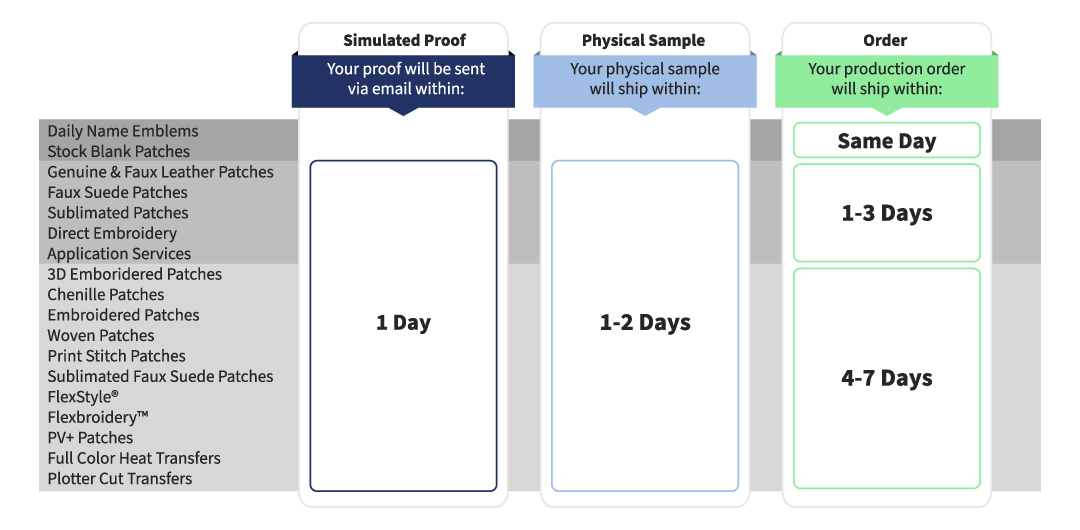
Stock products such as Thermal Label ID Tape, Blank Patches, and American Flag patches have next day delivery. Turnaround times may vary depending on the quantity ordered. Production times begin once payment terms have been established, a purchase order has been received and a sample has been approved.
Once an order is submitted, it instantly is sent to production, therefore no cancellations are accepted on custom orders that have been approved. Please visit our Terms and Conditions for more information.
World Emblem strives to satisfy all of our clients which is why we always send a physical sample for approval before producing your order. If you have any questions or issues with your order, contact our Client Services at 1-800-766-0448 and we will make it right. Also please visit our terms and conditions for more details.
Cart, Checkout & Payments
Cart and checkout have been redesigned into a more streamlined experience. You can review your products, shipping, payment information, and order total in one modern checkout flow.
Yes. When you add a product to your cart, a quick-view cart drawer provides an immediate summary of your order.
Yes. Retail customers can complete checkout without creating an account. After payment, you'll have the option to create an account and connect your order by verifying your email address.
Eligible customers can pay by credit card or applicable invoice/net terms. Apple Pay and Google Pay are also available for eligible customers.
Credit card processing has moved to a new payment system. For security reasons, previously stored card information cannot be transferred, so you'll need to add your card again the first time you use it.
When you're not paying on terms, the checkout experience shows applicable product costs, taxes, and shipping so you can review your total before completing your purchase.
For eligible products, Economy / No-Rush provides a discounted shipping option in exchange for a longer turnaround time.
Saved Carts are now called Lists. Lists allow eligible customers to save reusable order templates for future purchases.
Quotes
Quotes are available through your account dashboard alongside your other account information.
Eligible quotes can be reviewed and edited from your dashboard. Your available options may vary depending on the quote and your account permissions. Please contact your sales rep if you need help editing a quote.
Yes. When you're ready to move forward, eligible quotes can be converted into an order without recreating the products.
Yes. Quote communications may include an initial email and reminder notifications to help you keep track of outstanding quotes.
Accounts & Dashboard
You can check out as a guest — no account is required to place an order. However, creating an account has its benefits! Having an account lets you:
- Track your orders in real time
- Save shipping and billing information
- Enjoy faster, easier checkouts for future purchases
You can register in two easy ways:
- Before shopping: Click the Account and Orders menu at the top right corner of our website and select Create account
- After placing an order: You’ll be prompted to sign in or create an account during checkout.
Create an account today for a more seamless shopping experience.
Your dashboard brings your key account information together, including orders, Lists, addresses, users, invoices, Design Requests, and quotes.
New users must verify their email address before their first login.
Yes. If you create an account using the same email address you used during checkout, your previous orders will automatically be linked to it.
To reset your password, please click on forgot password while logging into your account.
Enter your username, and wait for a reset email to be received in your mailbox.
Emails & Notifications
Depending on your activity, you may receive updated emails for orders, shipping, Design Requests, quotes, account verification, and delivery.
Visit the Release Notes page for the latest features, enhancements, and improvements. We'll continue updating this page as new changes are introduced.
Need Help?
If you have questions that aren't answered here, please contact our customer support team. We're here to help you.

